WinRaR 4.65
Download Link: mediafire
Sunday, April 29, 2012

Friday, April 6, 2012

Anonymous OS 0.1 releases
Anonymous-OS 0.1 : Anonymous Hackers released their own Operating System
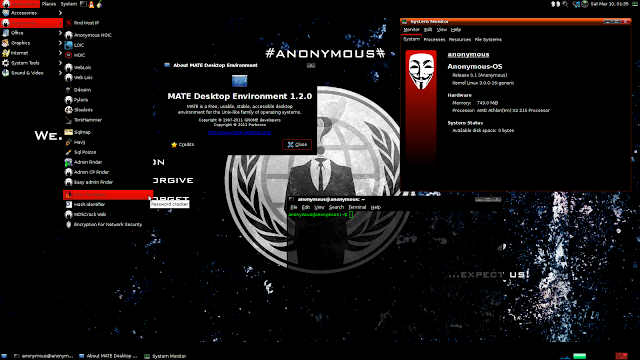
Yes! Its true, Anonymous Hackers released their own Operating System with name "Anonymous-OS", is Live is an ubuntu-based distribution and created under Ubuntu 11.10 and uses Mate desktop. You can create the LiveUSB with Unetbootin.

Yes! Its true, Anonymous Hackers released their own Operating System with name "Anonymous-OS", is Live is an ubuntu-based distribution and created under Ubuntu 11.10 and uses Mate desktop. You can create the LiveUSB with Unetbootin.
Pre-installed apps on Anonymous-OS:
- ParolaPass Password Generator
- Find Host IP
- Anonymous HOIC
- Ddosim
- Pyloris
- Slowloris
- TorsHammer
- Sqlmap
- Havij
- Sql Poison
- Admin Finder
- John the Ripper
- Hash Identifier
- Tor
- XChat IRC
- Pidgin
- Vidalia
- Polipo
- JonDo
- i2p
- Wireshark
- Zenmap
…and more
Download Anonymous-OS 0.1
Warning : It is not developed by any Genuine Source, can be backdoored OS by any Law enforcement Company or Hacker. Use at your own Risk.
Update: Another Live OS for anonymity available called "Tails". Which is a live CD or live USB that aims at preserving your privacy and anonymity.It helps you to use the Internet anonymously almost anywhere you go and on any computer:all connections to the Internet are forced to go through the Tor network or to leave no trace on the computer you're using unless you ask it explicitly, or use state-of-the-art cryptographic tools to encrypt your files, email and instant messaging. You can Download Tail from this link: http://adf.ly/7DX62

Tuesday, March 13, 2012
FeedingBottle 3.2.3 release
FeedingBottle is a Aircrack-ng GUI.
FeedingBottle ver: 3.2.3
Date :2012-03-12
Changelog:
- Fixed a bugs where SSIDs containing 32 characters caused a crash
Tip: Only supports the English system.
For BackTrack is R1 (2)-the Gnome-32 (64) bit Date :2012-03-12
Changelog:
- Fixed a bugs where SSIDs containing 32 characters caused a crash
Tip: Only supports the English system.
The MD5 (zip): 688d86d8c755d216e684669f0d77c3f6
Download the address: Here(mediafire)
For BackBox Linux 2.01-i386
The MD5 (zip): 0de5362151c7ae209494882a1d518bc4
Download the address: Here(mediafire)
Monday, March 5, 2012
Overcome Mediafire 'Oops! An unexpected error (369) has occurred'
fix mediafire files.........error visitor must read
Greeting to all... When you download the file and after you click the skip button all you got is mediafire home page or 'Oops! An unexpected error (369) has occurred',this is because mediafire have block adf.ly.But don't worry cause all you have to do is drag skip ad to the address bar instead of click it.When you got the medifire file link just hit enter.Doing this you will get the files that you want 

Currently mediafire have block adf.ly and all the download link will take you to the mediafire homepage or 'Oops! An unexpected error (369) has occurred'.The files are still available and just need to follow this simple trick.
Thursday, February 23, 2012
Recover Window Login Passwords Using Ophcrack LiveCD(XP,Vista,Window 7)
Ophcrack Home
Once you're there, click on the Download ophcrack LiveCD button. On the next page, click on either the XP or Vista link to download the correct ISO image file for your operating system. Choose the Vista version for Windows 7 as well. This file may take some time to download.
An ISO file contains everything that should go on a CD or DVD or USB in a single file. The Ophcrack LiveCD ISO file contains SliTaz (a Linux distribution), the Ophcrack software, and other files needed to recover passwords. Don't worry about the details - the Ophcrack LiveCD is fully automatic - no Linux experience required.
The next screen is the Ophcrack LiveCD software itself. Ophcrack will attempt to recover the passwords for all of the user accounts that it can find on your computer. This password cracking process is completely automated.
The important things to look for here are the accounts listed in the User column and the passwords listed in the NT Pwd column. If the user account you're looking for isn't listed, Ophcrack didn't find that user on your computer. If the NT Pwd field is blank for a particular user, the password has not been recovered yet.
As you can see in the example above, the passwords for the Administrator and Guest accounts are listed as empty. If you were cracking a password for a user that Ophcrack shows as empty, you now know that you can log on to the account without a password at all, assuming that the user account is enabled.
Look toward the bottom of the user list - see the Tim user account? In under one minute, Ophcrack recovered the password to this account - applesauce. You can ignore any other accounts you're not interested in recovering the passwords for.
After Ophcrack recovers your password, write it down, remove the Ophcrack LiveCD disc from your optical drive and restart your computer. You don't need to exit the Ophcrack software - it won't harm your computer to power it off or restart it while it's running.
In the next step, you'll finally get to log on to Windows with your discovered password!
Note: If you do not remove the Ophcrack LiveCD disc before you restart, your computer will likely boot from the Ophcrack disc again instead of your hard drive. If that happens, just take the disc out and restart again.
You can try this video to logon without password:
Once you're there, click on the Download ophcrack LiveCD button. On the next page, click on either the XP or Vista link to download the correct ISO image file for your operating system. Choose the Vista version for Windows 7 as well. This file may take some time to download.
An ISO file contains everything that should go on a CD or DVD or USB in a single file. The Ophcrack LiveCD ISO file contains SliTaz (a Linux distribution), the Ophcrack software, and other files needed to recover passwords. Don't worry about the details - the Ophcrack LiveCD is fully automatic - no Linux experience required.
Boot from cd and Wait for Ophcrack LiveCD to Recover Your Password

Ophcrack Software Running
The important things to look for here are the accounts listed in the User column and the passwords listed in the NT Pwd column. If the user account you're looking for isn't listed, Ophcrack didn't find that user on your computer. If the NT Pwd field is blank for a particular user, the password has not been recovered yet.
As you can see in the example above, the passwords for the Administrator and Guest accounts are listed as empty. If you were cracking a password for a user that Ophcrack shows as empty, you now know that you can log on to the account without a password at all, assuming that the user account is enabled.
Look toward the bottom of the user list - see the Tim user account? In under one minute, Ophcrack recovered the password to this account - applesauce. You can ignore any other accounts you're not interested in recovering the passwords for.
After Ophcrack recovers your password, write it down, remove the Ophcrack LiveCD disc from your optical drive and restart your computer. You don't need to exit the Ophcrack software - it won't harm your computer to power it off or restart it while it's running.
In the next step, you'll finally get to log on to Windows with your discovered password!
Note: If you do not remove the Ophcrack LiveCD disc before you restart, your computer will likely boot from the Ophcrack disc again instead of your hard drive. If that happens, just take the disc out and restart again.
Did Ophcrack Not Find Your Password?
Ophcrack won't find every password - some are too long and some are far too complicated. If Ophcrack didn't do the trick just try another free Windows password recovery tool. Each of these tools work a bit differently so another program might have no problem at all recovering or resetting your Windows password.You can try this video to logon without password:
Monday, February 20, 2012
reaver-wps Brute force attack against Wifi Protected Setup

Reaver implements a brute force attack against Wifi Protected Setup (WPS) registrar PINs in order to recover WPA/WPA2 passphrases, as described in http://sviehb.files.wordpress.com/2011/12/viehboeck_wps.pdf.
Reaver has been designed to be a robust and practical attack against WPS, and has been tested against a wide variety of access points and WPS implementations.
On average Reaver will recover the target AP's plain text WPA/WPA2 passphrase in 4-10 hours, depending on the AP. In practice, it will generally take half this time to guess the correct WPS pin and recover the passphrase.
Download (mediafire reaver 1.4)
Subscribe to:
Posts (Atom)